
Menu

Built for your team and your customers

Run a smoother restaurant. Make every order easier.

NomioHub connects ordering, checkout, kitchen work, inventory, rewards, and reporting so your team has less to piece together—and customers get a simpler experience from menu to pickup.

Offers

Make your next special easy to order.

Run a lunch combo, a happy-hour deal or a buy-one-get-one, and choose exactly when and where it shows: online, at the counter or on the kiosk.

Book a 20-minute demo

Your menu, your deals

Build combos and buy-this-get-that deals from individual menu items or whole categories.

Choose when and where

Select online ordering, register, cashier or kiosk. Limit offers by location, start and end date, day of the week and time of day.

Keep your menu organized

Name the offers section on your menu, save drafts, duplicate a favorite and archive offers when they finish.

See what sells

See how many of each offer sold in your reports.

Live order board

Every active order. Right on the register.

See every order at a glance, from scheduled pickups to ready to hand off, right on the register. Your kitchen display shows the same orders in real time.
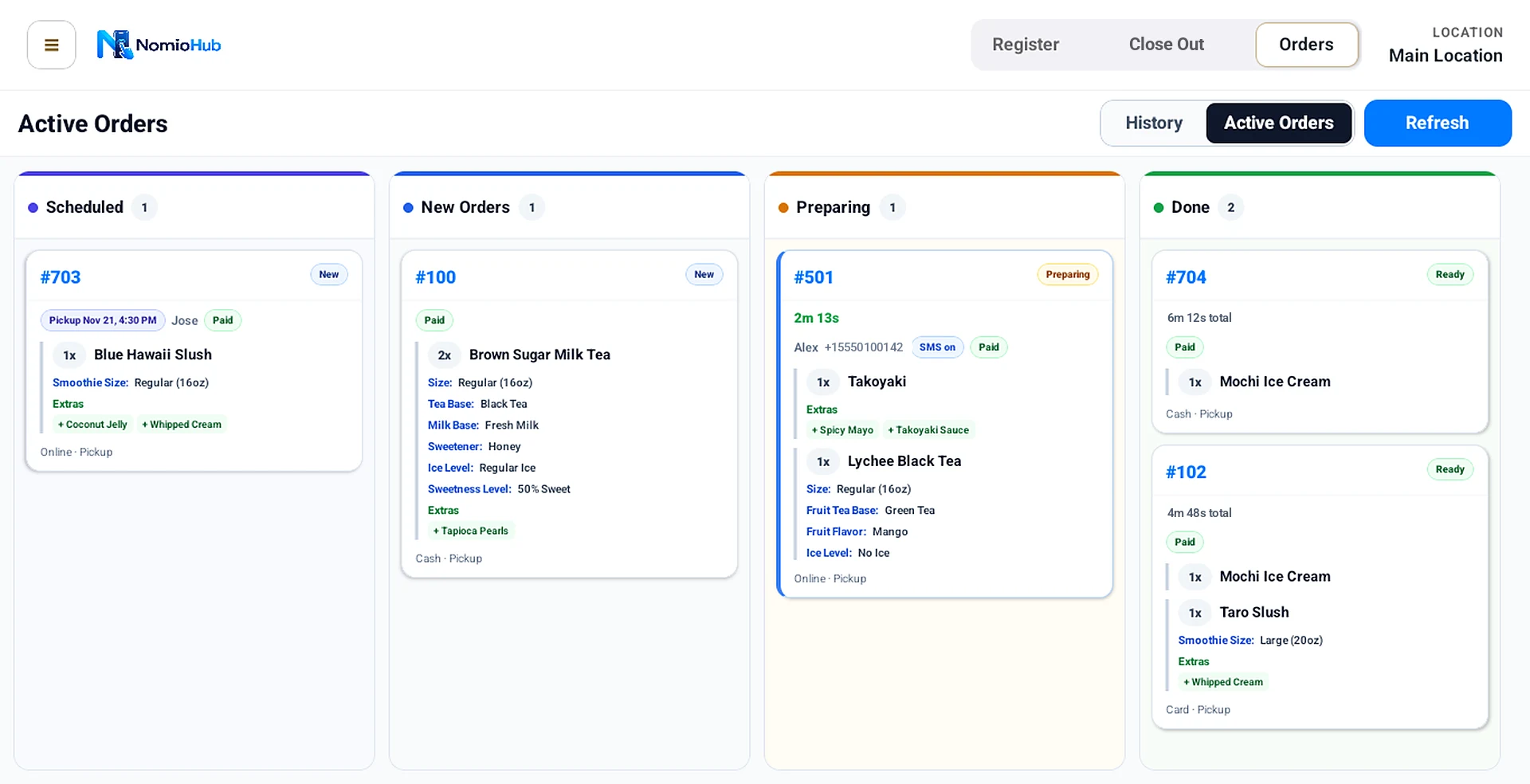
NomioHub active orders board with Scheduled, New, Preparing and Done columns.

Select the screenshot to view it at full size.

Keep the shift moving

Follow Scheduled, New, Preparing and Done columns, with prep timers and payment status. Start all, complete all or deliver all from the board.

See orders waiting to sync

Orders taken while the internet is down appear on the register too, clearly marked as waiting to sync.

Keep customers in the loop

Customers who opt in get a text when their order is ready, so fewer people crowd the counter asking. Staff can see whether each text was sent or delivered.

Make direct ordering easy

Give customers a simple way to order from you while keeping control of your menu, hours, and customer relationship.

For your team

  • ✓Accept direct pickup orders without sending every customer through a marketplace
  • ✓Offer ASAP or scheduled pickup and decide what happens outside business hours

For your customers

  • →Browse a mobile-friendly menu, customize items, and check out without calling
  • →Choose a pickup time, opt into order-ready text updates, and follow order progress on a clear status page

Keep every order moving

Bring online, counter, and kiosk orders into a workflow your front counter and kitchen can follow together.

For your team

  • ✓See Scheduled, New, Preparing and Done columns on the register, with prep timers and payment status
  • ✓Start all, complete all or deliver all from the board; see offline orders marked as waiting to sync
  • ✓Follow the same orders on the kitchen display in real time
  • ✓See whether opt-in order-ready texts were sent or delivered
  • ✓Give the kitchen the customer name, order details, and preparation notes it needs

For your customers

  • →Get consistent order progress whether the order started online, at the counter, or at a kiosk
  • →Check the latest order status without calling the restaurant

Serve the line faster

Handle quick counter orders, detailed customizations, and flexible checkout without breaking the flow of service.

For your team

  • ✓Run staffed checkout on Clover Station Duo and customer-led ordering on a self-ordering kiosk
  • ✓Look up returning customers and handle cash, card, or split payments without leaving the order
  • ✓Show the customer an order summary before paying, offer card tipping and keep refunds linked to orders

For your customers

  • →Order with staff or use self-service, depending on how they prefer to buy
  • →Pay with cash or card and split payment by amount or by item

Turn menu sales into useful inventory data

Connect what customers order with the ingredients and stock your team manages behind the counter.

For your team

  • ✓Link products to recipes so ingredient quantities are deducted as items sell
  • ✓Record deliveries and show menu items as sold out when an ingredient runs out, based on your stock settings

For your customers

  • →See the choices and add-ons that actually apply to each item
  • →Avoid ordering products your team has already marked unavailable

Give customers a reason to come back

Create rewards that fit your menu instead of forcing every promotion into the same points-for-discount model.

For your team

  • ✓Offer points, free items, paid add-ons, discounts, signup bonuses and double-points promotions
  • ✓Respect location availability and reverse points when orders are refunded

For your customers

  • →Join and look up rewards with a phone number, then redeem with a PIN at checkout
  • →Choose from product, add-on, and discount rewards instead of a single generic coupon

Know what is driving the business

Compare sales, products, employees, and operations by location so you can act on patterns instead of guessing.

For your team

  • ✓Track net collected, refunds, average ticket, tips, and order trends across locations and sales channels
  • ✓Find top products, popular add-ons, busy hours, and preparation slowdowns
  • ✓Review employee and register activity, then export the data or print a report

For your customers

  • →See the correct menu, hours, and pickup choices for the location they select
  • →Get faster answers when they have a question about an order, payment, or refund

24/7 chat support

Get help any time, right inside NomioHub.

See how NomioHub fits the way you serve customers.

Tell us about your current ordering and payment setup. We will review the Clover hardware and processing options that fit your business.